The Design Landscape of Robot Learning Is a Minefield
15 Apr 2026 by Adam Allevato
I spent about a year building the software and hardware for a fully robotic version of the classic wooden Labyrinth game - the one with a marble guided through a tilting maze controlled by two knobs - from the ground up. It was an exercise in learning, patience, and perseverance.
The goal: have the robot use reinforcement learning to learn how to play the labyrinth game and solve any maze I threw at it. Spoilers: I got it working in simulation, built a lot of pieces, and got a simple problem solved on real hardware, but other projects came calling before I ever got the labyrinth to finish solving itself.
Even as someone who has worked academically and professionally on robots for a decade, across hardware, VLAs, and everything in between, I was repeatedly surprised at just how narrow the path to success is in robot learning, for both hardware and software. The entire landscape of “teach a robot to do a thing” is a minefield. I learned several lessons, and viscerally experienced several other lessons that I had only read about before this project.
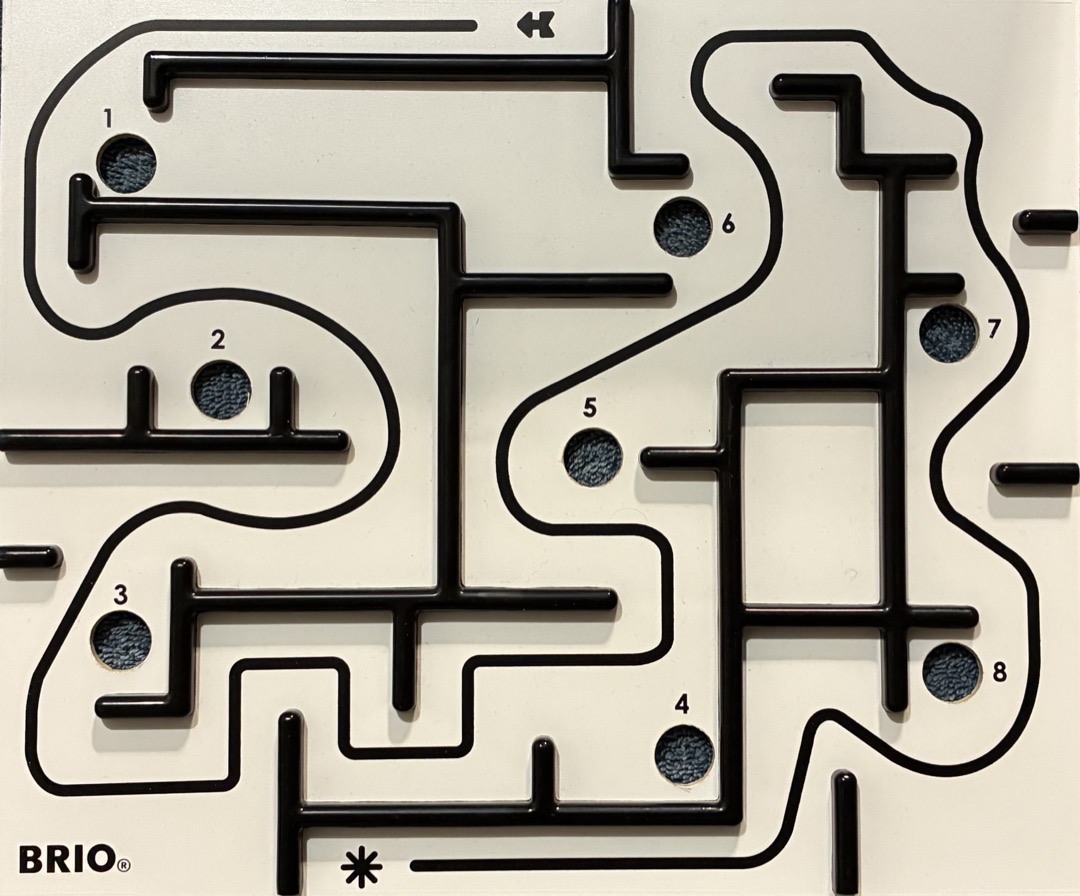 This image is also a metaphor of my path taken during the project.
The Starting Point
The goal was to make a robot that could get a marble all the way through the maze using only visual input from a top-down camera. Pixels in, two control signals out.
Before I had picked up a single tool or wrote a single line of code, I made a discovery. Between when I wrote this paper in 2020, which developed an efficient way to learn the parameters of a simulated labyrinth to match a real one, and late 2024 when I started this project, two students at ETH Zurich already solved the labyrinth autonomously! I’d wanted to work on this problem since 2020. But in some sense I had already been “scooped” on my own project by Thomas Bi and Rafaello D’Andrea. Well played.
Learning: ideas in this space have a shelf life - someone else may pull the same idea off the shelf first and yours will go stale.
I still knew a lot about the problem, the labyrinth mechanism itself, AND now I had an existence proof of the solution. Plus, I wanted to know: could I teach the system to solve any maze, not just the single one that the labyrinth game came with? I set out to re-test most of the lessons in Bi and D’Andrea’s paper for myself. I decided to be methodical and build out this stack from the ground up - starting with the hardware.
Hardware
The labyrinth mechanism is simple: the two knobs each turn a metal rod. Each rod acts as a very wide pulley for a spring-loaded string attached to one axis of the tilting board mechanism. I knew I wanted the robot to have full control over the mechanism, so I had to tear apart the labyrinth and rebuild it as a robotic one. I would need to add motors to control the rotation of each rod. The premium version of the labyrinth toy included several different maze layouts (which can be seen throughout this post). But ultimately I wanted to customize the maze layout beyond those provided, so this meant tearing down even more of the toy.
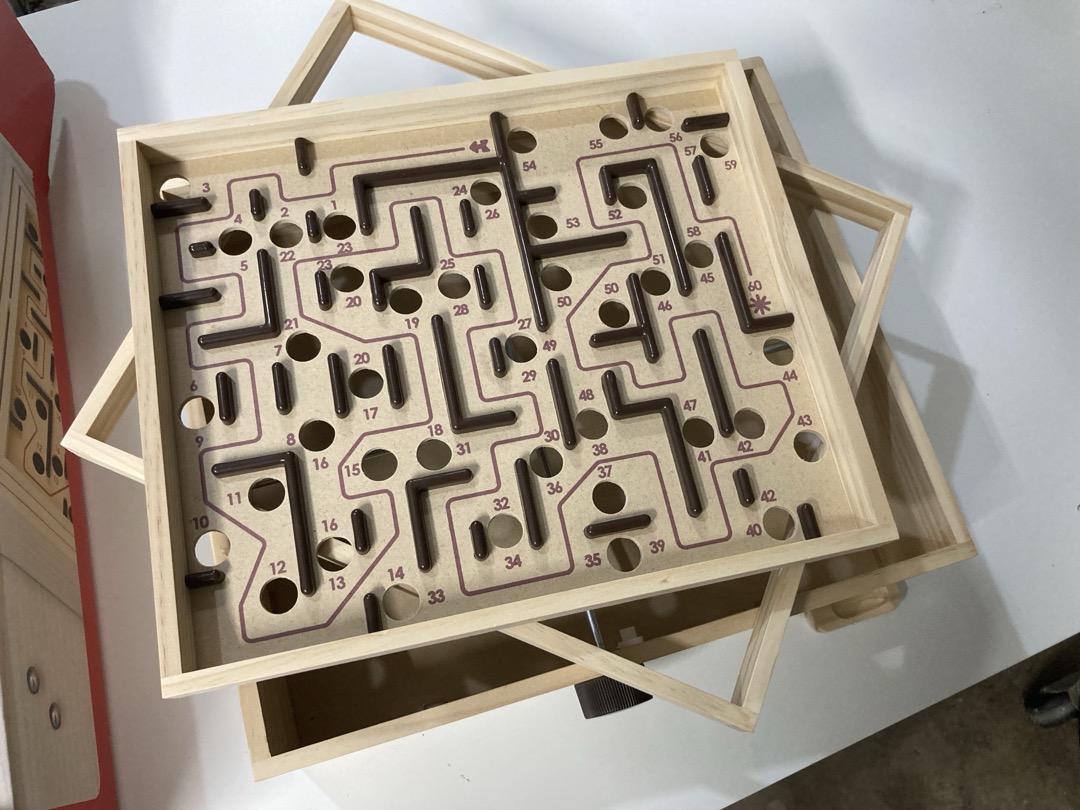 The game that would occupy my free evenings for several months (partially disassembled)
The swappable boards goal meant trips to the maker space to laser cut new boards, buying new metal rods to act as pulleys, and 3D printing adapter pieces and mounts. More than 10 separate parts orders were placed. All in all, 4 labyrinths were purchased throughout the project. Passive voice is being intentionally used in order to avoid implicating myself with these statistics.
The most fun part of this rebuild was a LinkedIn conversation with a real life toy designer who worked in Europe at the Brio company. I wanted to know what string material the labyrinth used for its pulleys. Making the maze board swappable is a destructive operation, and I wanted to replace the cut strings with an identical pair. I reached out as a total long shot and used my free trial of LinkedIn Premium to send a message to someone I had 0 chance of having a mutual connection with. Astoundingly, they responded that they were interested in the project, but they kindly informed me that no, they would not tell me what kind of string and springs their labyrinths used. I suppose now that I had reverse engineered the entire device, the trade secret of “what string to use” was one of the only things preventing me from starting a rival labyrinth company. I started with some string I had lying around. Remember this string; it will show up later.
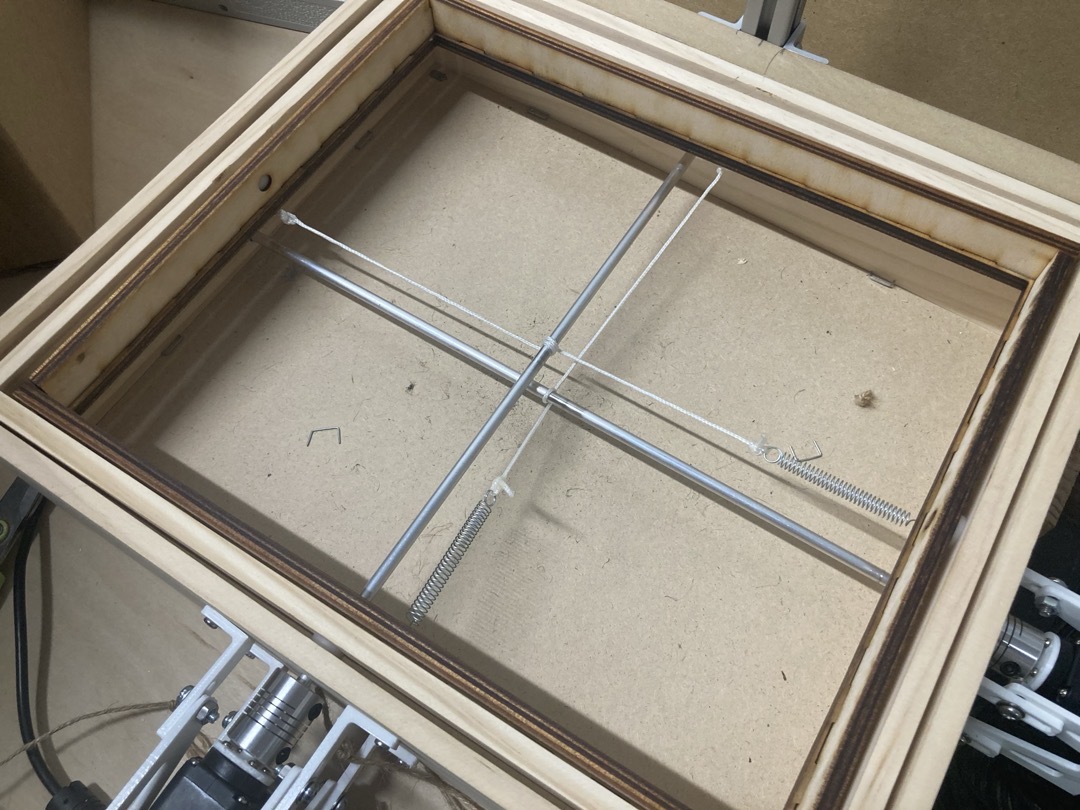 Surely nylon string will work
I had to mount a top down camera so the robot could see where the marble was, which was easy with some aluminum extrusion and MDF. I also went down an entire rabbit hole of labyrinth maze design, which is a topic for another post. At this point I am confident I could build a very cool premium labyrinth product - if you want one, shoot me an email.
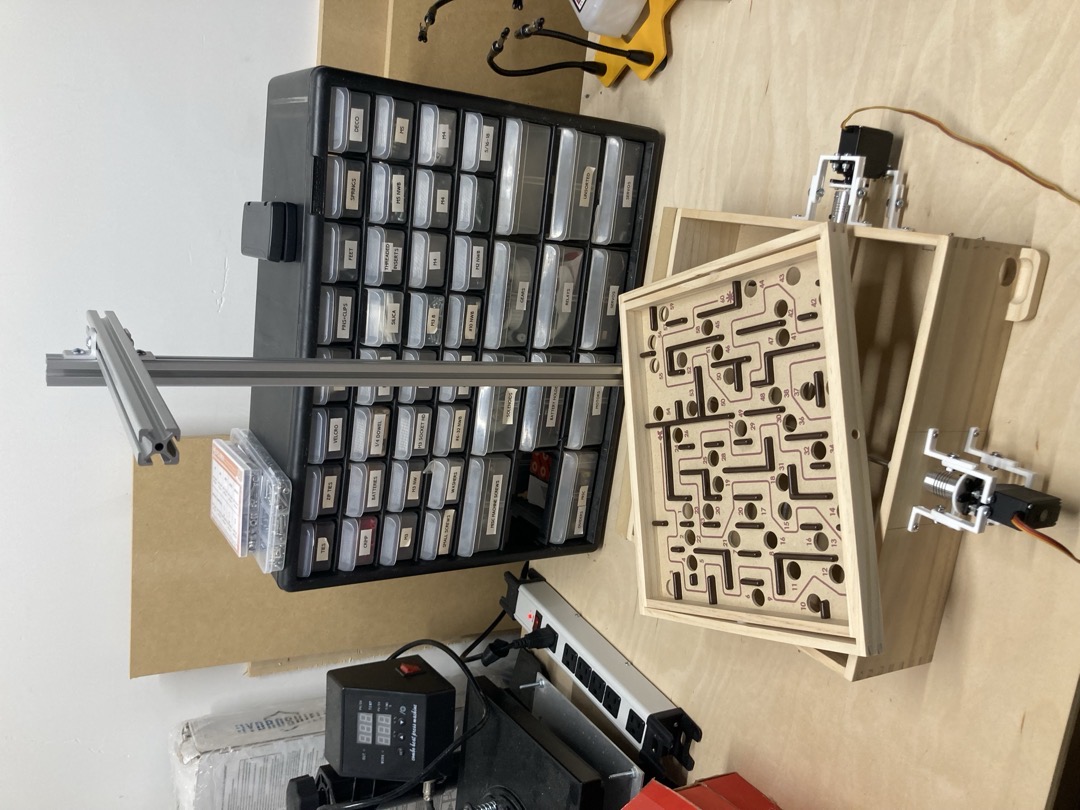 The motor mounts and camera tower coming together
The other major hardware to design was a marble dispenser. Reinforcement learning is a time-consuming process, and if my robot labyrinth was going to be dropping hundreds or thousands of marbles into holes as it learned, I didn’t want to be resetting it manually every time. So I designed a marble dispensing system with a 40-marble capacity. This was its own 5-iteration process in itself. My 3D printer earned its keep as I went through 4 dispensing mechanism iterations. For the hopper, I tried a ladder-shaped hopper (jammed), a funnel (jammed), a plastic flexible tube (kinked), and finally settled on a long vertical piece of PVC. Capacity: roughly 45 marbles.
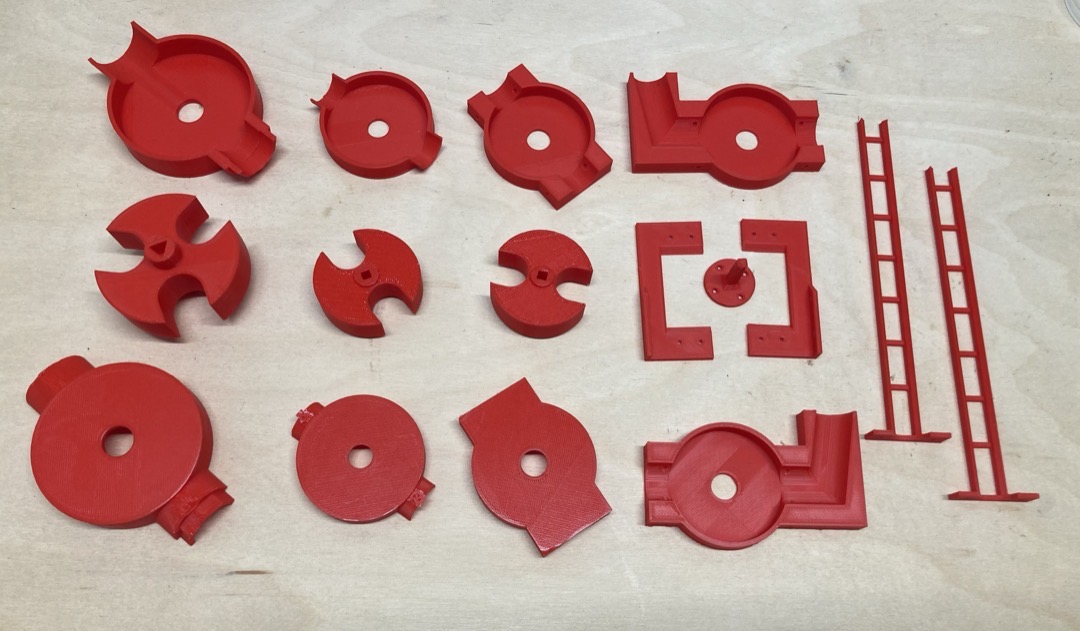
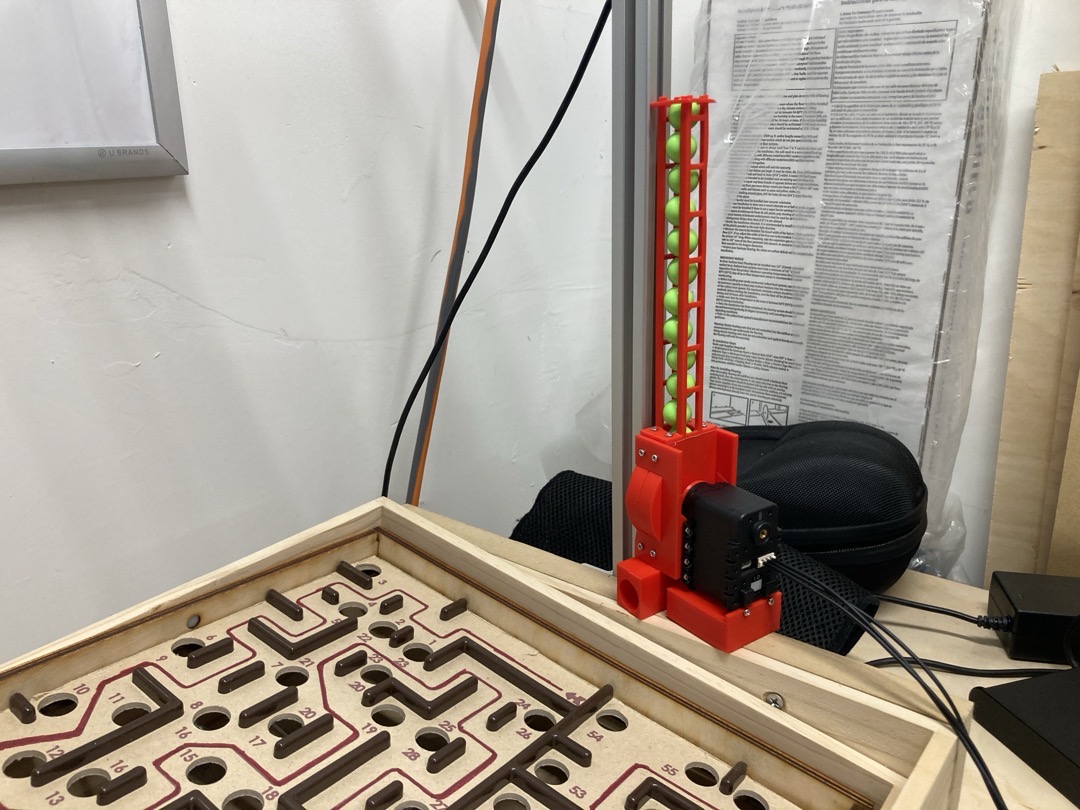 Final dispenser, but with an early mini-hopper design
Learning: the machines supporting and surrounding the robot are often as important as the robot itself, and can take just as much design effort.
Controls
At first, I chose to control the rebuilt labyrinth with cheap servo motors and an Arduino microcontroller. This was enough to get me to a “remote control” version of the labyrinth, where I could control the board angle using arrow keys or a SpaceNav 3D mouse.
Controlling the labyrinth board using “tilt-by-wire”
Boom - landmine. Almost immediately, it became clear that this design was not going to work, for two reasons:
First, the servo motors could not move very fast, and milliseconds matter in the labyrinth game.
Second, and more importantly, the string-based pulley could very easily slip. This would change the “zero point” of the servos, which is the servo position that made the board flat. This would make learning very difficult (the problem would be non-stationary). It also would guarantee that at some point, the servo would be unable to tilt the board fully in both directions. The range of motion of the board would require additional range of motion that the servo just didn’t have. I could not remove slippage by adding additional turns of the string around the rod, or tightening the springs, because this would cause the mechanism to bind up. This exact failure killed an overnight RL attempt. Another landmine, and I am reminded of the essay Reality Has a Surprising Amount of Detail.
I moved from my cheap servos and Arduino to motors and a controller from Dynamixel. These motors are about 10x the cost of cheap servos, but they can move much faster, and also can be put into a continuous rotation mode, with effectively infinite range of motion. This solved the slippage problem, although it did mean that I would have to move to velocity control, not position control, for the servos, which would make the learning problem harder.
Learning: there is a floor to how cheap you can go with “cheap hardware.”
Even when using Dynamixels, I had to make additional concessions to real world concerns: heat. Reinforcement learning algorithms do not take frivolous concerns like jerk and temperature into account. During the real-world robot learning process, the algorithm would often end up in one of two failure modes: oscillation or turning continuously in one direction. Oscillation would cause the motor itself to overheat. Turning continuously would cause the string to continuously slip on the pulley rod, which would build up so much heat due to friction that nylon strings would melt and natural fiber strings would char. Two more project-killing landmines. If only that Brio designer would have told me the string material!
In the end, I found mason line to work well, even though it still needed replacing every few weeks. I’m sure I was pushing this mechanism way harder than even the most labyrinth-obsessed child.
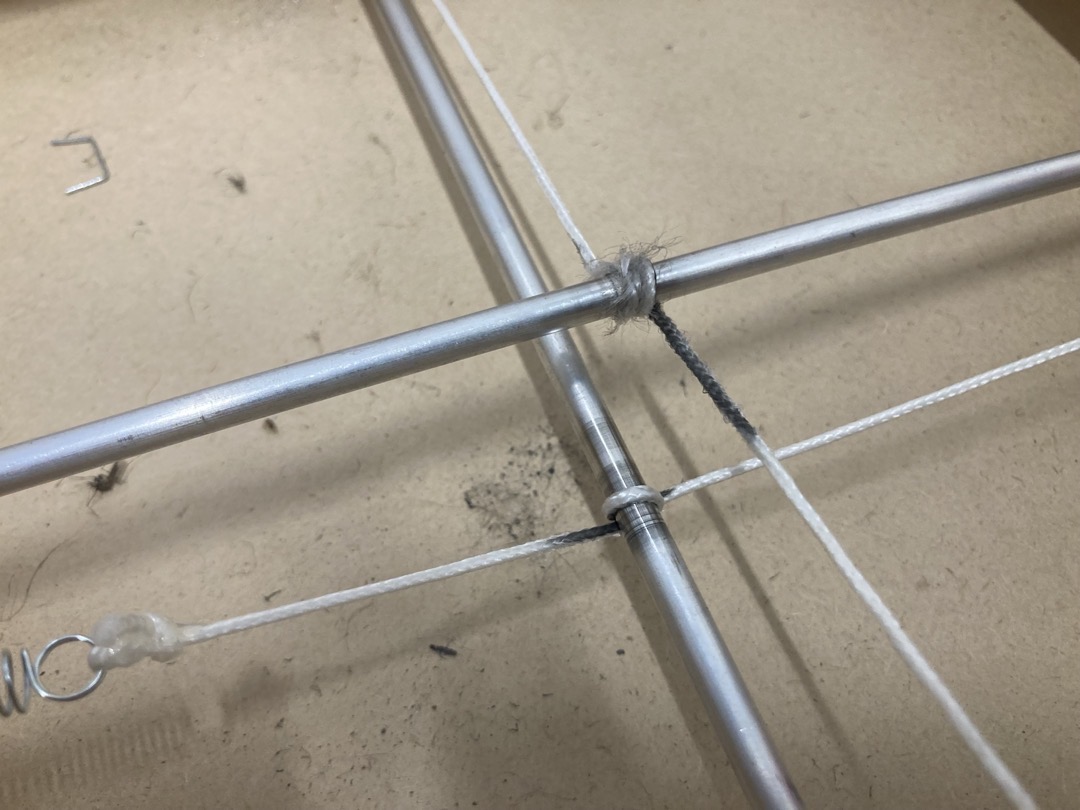 Burnt string
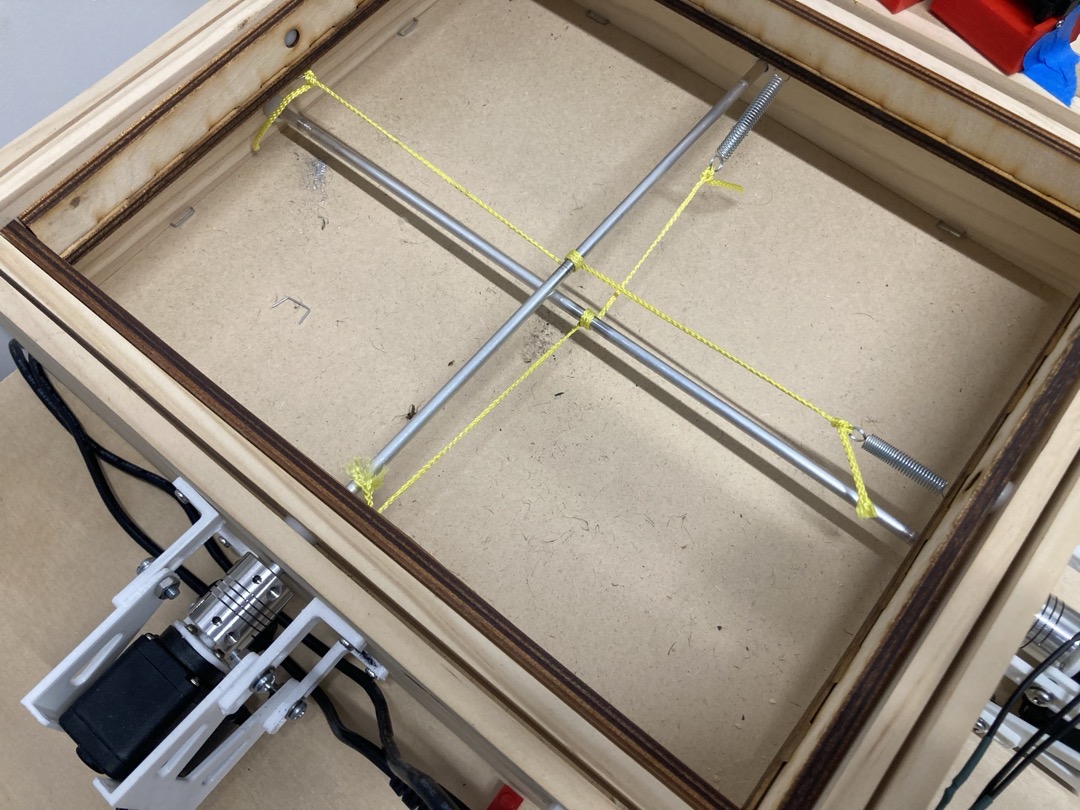 Mason line is both elastic and durable
These issues had nothing to do with my choice of hardware, but I had to add special features to my Dynamixel driver software to fix it. After my changes, the software would pause control when the motors were over temperature, and would also refuse to send motor commands if they came in the same direction for too long (since this had no impact on the board’s motion anyway).
Learning: the real world is not designed to be automated, and this has real implications for how robust a robot has to be, both at the hardware and software levels.
RL
I started simple and worked my way up. First, I wrote DQN for my RL algorithm, which was used to beat Atari games. DQN produces discrete actions, and I knew I was going to need continuous, so I quickly moved to DDPG.
I also started with a simpler goal: learn to balance the marble in the center of a flat board with no holes and no walls.
Starting with my DDPG implementation, I trained on a simplified PyBullet simulation of the labyrinth mechanism to ensure my RL implementation was correct. Both position control and velocity control variants worked. Then I transferred the approach to the physical labyrinth. After about 4-6 hours of real-world training with velocity control (overnight), it could reliably keep the marble near the center of the board. This was the first moment where the system actually learned something useful on real hardware.
About as good as the world’s least reactive PID controller
In a simulation of a maze, the algorithm could solve it fairly reliably:
In this training visualization the robot gets the marble to the end of the maze quickly, and then just hangs out, unsure of what to do with itself.
 In this run, you’re seeing the actual visual input to the policy (very downsampled, which is why it’s blurry).
Swapping for a real maze layout, the robot would reliably learn to reach hole 2 (out of many) but plateaued there after 80 iterations. The sample efficiency wasn’t adequate for this task - it took 4-6 hours to learn to balance, how many weeks of training would it take to learn an entire maze when it had to start over each time it messed up in the slightest? And poor sample efficiency means more wear and tear on the physical system. I lost track of how many times I had to replace the pulley strings.
Learning: low sample efficiency magnifies all the problems of the real world: resets, physical hardware breaking, and 1x realtime
This project really highlighted in stark relief just how sample inefficient those early approaches were (see Alex Irpan’s older blog post Deep Reinforcement Learning Doesn’t Work Yet ).
World Models
I was working up to the more modern approaches that had shown promise on real-world tasks, including the ETH Zurich labyrinth paper. In this case, I moved to a world-model based system: DreamerV3. DreamerV3 is capable of imagining (“dreaming”, get it) what the world would look like if it took specific actions. This allows it to be much more sample efficient. I took this same approach years ago in my PhD research, but I used an explicit simulator, not a learned world model, to do the dreaming.
DreamerV3 is fiddly, and it is written in Jax, which is hard to reason about, extend, and debug. Despite that, as long as you set up your environment to play nicely with it, its sample efficiency means that it performs well on many RL problems.
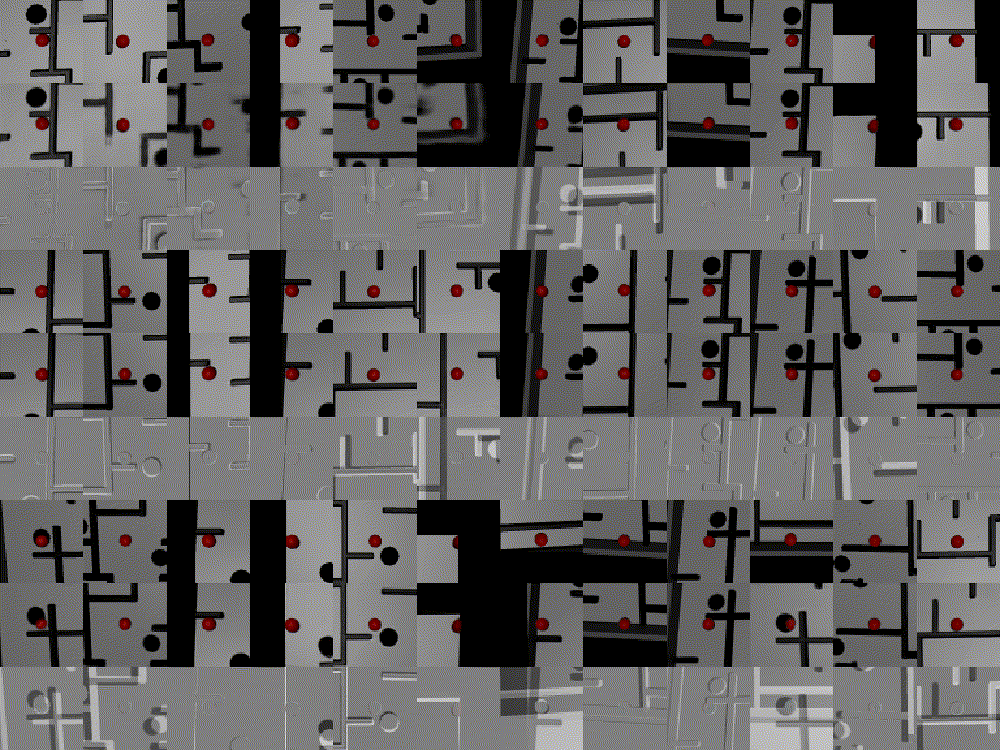 Training with Dreamer. The top row is the visual input to the policy. The middle row is the learned prediction of the state, informed from past states and actions. The bottom shows the difference. In this case, training has been going many thousands of steps, and the predictions are pretty good.
Naturally, this meant rebuilding my simulation, switching from PyBullet to MuJoCo, and modeling an entire labyrinth in MuJoCo. This was a huge pain. Robotics simulators don’t calculate collisions with moveable concave meshes. For many objects this is no problem, because there are tools like V-HACD which will decompose it into convex shapes. But a labyrinth board with 10-50 holes is like the final boss of convex decomposition, and V-HACD fails miserably. I tried several auto export tools - V-HACD, obj2mjcf. None worked. Eventually I decomposed the mesh myself (dusting off my Blender skills), then wrote my own python script to export each convex mesh as a separate OBJ file and generate the MuJoCo MJCF file from that.
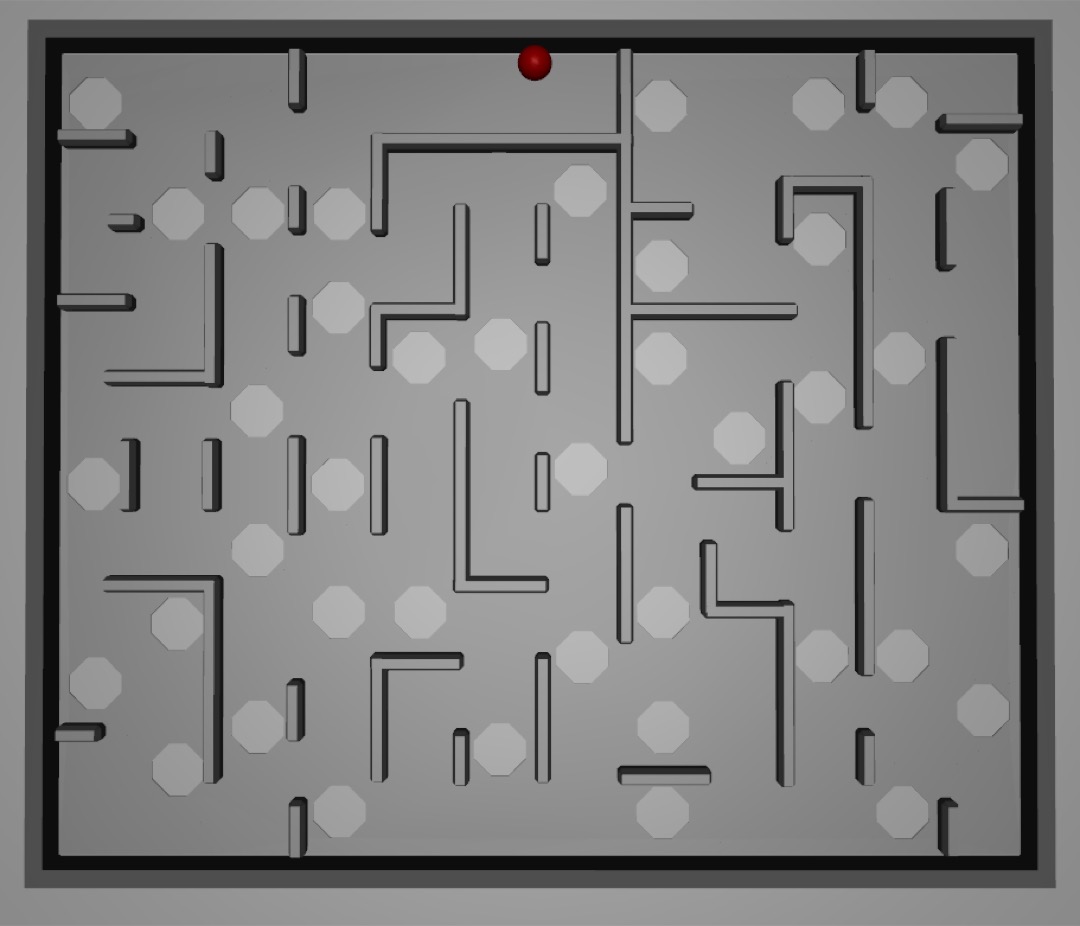 Eventually, I was able to get several boards, including this one, to simulate in MuJoCo.
Reward function was also a “fun” problem to figure out for this task. I knew I needed to use a reward that was based on how far along the maze the marble had gotten. But how do we know how far along the path the marble is? First, I had to define the correct path through the maze. Then, I applied a Voronoi decomposition to the path, plus an additional mirroring hack to ensure that the cells of the decomposition were finite. Determining which voronoi cell the marble was in is straightforward. Then, taking that cell’s index along the correct path as a fraction of the total number of points along the path gives the % of the maze that was complete, and from there, it’s easier to build a reward function.
Of course, the robot could learn to cheat and skip the correct path, jumping through a gap in the labyrinth walls. After working on the reward function for a few hours, I decided I could revisit this later (and as you’ll see, I did).
Learning: certain choices of task and environment can have an outsize impact on how hard your problem is to model.
Now, with DreamerV3 and a custom reward function, I could get the algorithm to learn to solve a very simple labyrinth in just a few hours of training - in simulation.
 A long labyrinth run - about 80% of the maze is completed. This cropped view is the visual input to the policy.
Real-World RL
Taking that simulation-capable DreamerV3 onto a real robot did not fully work. The training update step of the algorithm took about 0.4-0.5 seconds, during which time the servos would continue to not just hold position, but hold velocity. This resulted in huge board angle swings that could cause an otherwise good run to fail, and they would happen in every 5-10 seconds.
You can see this in the video below, which represents the best performance on a physical labyrinth that I achieved. Every time the motors “full send” in a direction (this can be heard more easily than seen), a learning update is happening. This prevents the robot from getting through the serpentine corridor.
This was a problem already seen in the original ETH Zurich paper, and was addressed in DayDreamer, which was specifically designed for continuous RL. DayDreamer syncs between two processes at an interval: one trains the actor-critic and world model, and the other continually performs inference to generate actions. The two sync up using interprocess communication at a set interval.
Unfortunately, setting up DayDreamer gave me no end of problems, because of differences in CUDA/Jax/OS versions between my system and what the original DayDreamer code/paper used. DayDreamer is also based on DreamerV2, not DreamerV3, so some of the tweaks I had made did not translate over to the older codebase.
I also tried using the SAC-X approach outlined in the paper A Walk In the Park, but found that the approach didn’t scale well to policies that took visual input like my top-down labyrinth.
Learning: it’s easier to write new code for a new research approach and get it to work, than copy an existing paper and get it to work in a new domain - even if that paper includes a code release. A large part of this is dependency drift and incompatibility.
A Reset
Allow me to remind you that this was all happening while I worked a day job, owned a house, and was starting a family. And I was sitting in my garage, late at night, watching this for hours:
Big thanks to my wife for supporting me through this project.
I started to wonder (and wrote in my project log at the time): why exactly am I doing this? No offense to the researchers who wrote it, but tweaking research code and fixing bugs so it would work on my own slightly-less-interesting robot was not making for a fun side project. And because of everything else going on in my life, I didn’t have time to run endless tweaking trials on a physical labyrinth. Each run would take a minimum of 15 minutes to determine if learning was progressing, or if some bug remained.
I took a deep breath and a deep step back. I was probably not going to have the time to make the physical robot actually solve the labyrinth. So where in this project were there still interesting things to learn?
After some thought, I landed on the intention of solving ever-more complex mazes on the simulated labyrinth. The challenges of continuous RL could wait for a separate project. I began to systematically knock down the issues with the DreamerV3. Eventually I found a version of DreamerV3 that was written in PyTorch, and adopted it as my primary learning implementation. This meant that I had now used TensorFlow (DreamerV2/DayDreamer), JAX (DreamerV3), and PyTorch (DreamerV3-pytorch.)
I sat in this “actually tuning RL” stage of the problem for some number of weeks - it had happened during earlier stages, but this was more methodical. The bugs I was fixing were things like reward scaling, batch and replay buffer sizes, and simulation environment.
For example, I initially set the inertia of the labyrinth board too high. This meant that the simulated motor controllers were much less responsive than was required for robust, responsive control. I adjusted the inertia around training iteration #22 and it was one of the single largest things that I did to improve performance - learning got about 30-40% faster.
 An example of what policy rollout looked like when the board inertia was too low - it had to use corners heavily and had a hard time getting past any parts that required rapid control changes, like the hole in the lower left.
I also had to revisit the “cheating” part of the reward several times, because the simulated agent cheated much more readily than a real-world robot could. Basically, if the reward function would increase by more than one or two steps (jumping more than one or two Voronoi cells ahead in a single timestamp), set the entire reward to 0 and end the episode. This was yet another case where I re-introduced some of the features from Bi and D’Andrea’s paper. Backtracking was a similar concern - as in the paper, it should be penalized just as much as going forward is incentivized.
Here are some more notes from my project log during this time for flavor:
train_ratio 512->128, pretrain 100->5Fixed minor bug with original implementation of reward from ETH paperMake walls higher in simulated labyrinthFigured out that the reason Sim 36 was killing itself was because it was loading so many episodes that it was exhausting system memory, and then I think the OS was killing it.
All of this was made possible by the use of simulation. Looking back across the project, every time I used simulation, even just as a precursor to the real robot, the workflow was easier, smoother, and faster.
Learning: use simulation wherever possible for your robot. If simulation is not possible, consider whether you can make it possible.
The End?
About 40 tweaking/tuning runs later, I decided that my list of learnings is long enough. I stopped working on the labyrinth because I’d extracted the skills, lessons, and fun I came for. Even with the leverage provided by Claude/Codex etc., there are too many other interesting projects to work on, like my home robot and several other new ideas.
If I were to pick this project back up, the first thing I would do is rewrite the learning algorithm from scratch. This would ensure that I knew exactly what parameters were being defaulted to, as well as all the specific modeling choices that were made. In other words, I’d specialize the learning algorithm (and implementation) to my setup. It is only a hobby project, after all. But if I keep writing about this for too long, I’ll get sucked back in!
My overall takeaway from this project is that there are still not well-established paths through the design space for robotics. Software has had decades to converge on operating systems, hardware abstraction layers, tooling, design patterns, and best practices. On the other hand, despite what you might hear about “engineering the ideal robot knee” or “the ChatGPT moment for robotics is here”, the field of robot learning is moving so quickly that there is no time for projects to accrue any robustness. By the time people really start digging into a Dreamer RL algorithm or a simulator, the creators supersede it with a new version that has a new set of bugs and integration woes.
In the minefield of project-killers that is robot learning, each of my own learnings represents a mine I stepped on along my path towards real-world RL success. Every company in this industry is exploring their own new path, and this is true no matter how slick their demos look or how large their team is. These companies must solve all the issues I encountered, and many more, at an organizational or industry-wide level before we can scale the technology to have real impact.
Epilogue: collected learnings
What did I learn about robot learning? Here are the lessons collected here for your viewing pleasure.
- Ideas in this space have a shelf life - someone else may pull the same idea off the shelf first and yours will go stale.
- The machines supporting and surrounding the robot are often as important as the robot itself, and can take just as much design effort.
- There is a floor to how cheap you can go with “cheap hardware”.
- The real world is not designed to be automated, and this has real implications for how robust a robot has to be, both at the hardware and software levels.
- Low sample efficiency magnifies all the problems of the real world: resets, physical hardware breaking, and 1x realtime
- Certain choices of task and environment can have an outsize impact on how hard your problem is to model.
- It’s easier to write new code for a new research approach and get it to work, than copy an existing paper and get it to work in a new domain - even if that paper includes a code release. A large part of this is dependency drift and incompatibility.
- Use simulation wherever possible for your robot. If simulation is not possible, consider whether you can make it possible.